Personal Website
New in iTOVi: Promote Your Business Right in the App!
We’re excited to announce a new feature in your iTOVi app that makes it easier than ever to promote your business!
Do you offer more than the products you recommend through iTOVi Scanner or iTOVi Face Scan? Maybe you run a wellness business, host events, or offer services and unique products you’d love to share with your scanned clients. Now you can cross-promote them with ease.
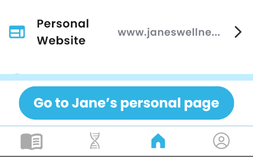
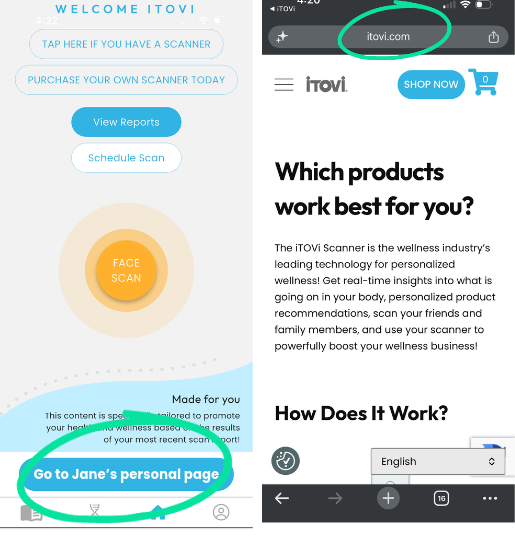
With the new Personal Website feature, you can add your website to your Profile, and it will be displayed prominently on the home screen of your clients’ iTOVi app. Every time they open the app to review their scan results, your link is right there waiting. With just one click, they’re taken to your page to explore everything you offer beyond their recommended products.
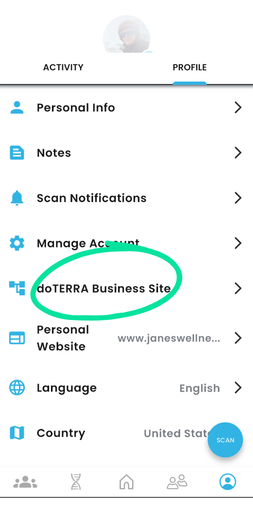
iTOVi has always supported in-app shopping for clients of doTERRA and Young Living distributors, letting you link your affiliate or business site directly to the products shown to your clients so they land on your customized company site. Now, with Personal Website, you can also showcase all of your other services and products, right inside the iTOVi app.
How to set it up: Open the iTOVi app, tap the Myself icon (bottom right), and select the Profile tab. Scroll down to Personal Website and enter your site. It’s that easy!
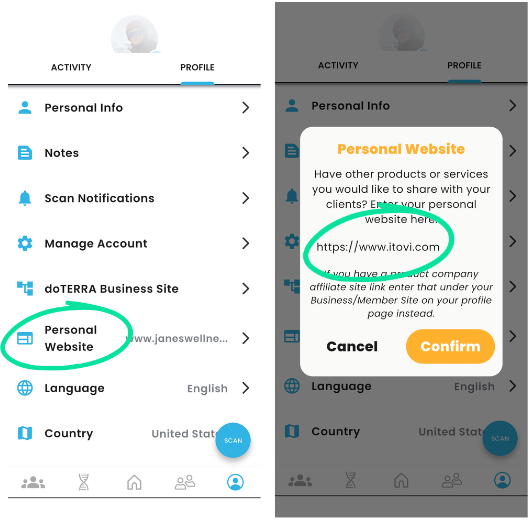
Now when your clients open their iTOVi app they see your personal page right on the home page!
One click and they can see all you offer!
While you’re in Profile, if you distribute for Young Living or doTERRA, make sure your business link is entered too. That way, your clients’ recommended products link directly to your branded company page, where they can check out and you get credit for their purchase!
Your clients already turn to iTOVi to understand their wellness, so make sure they can find everything you offer while they’re there. Take two minutes to set up your Personal Website today and start turning every scan into a new opportunity to grow your business!